Dashlane vs LastPass 2026: Latest Test Results
Reading time: 19 min
First published: Jun 14, 2022
Updated 3 times since publishing
-
![Kate Hawkins]()
-
![Sarah Frazier]()
Fact-Checked by Sarah Frazier Former Content Manager


Short on time? Here’s our verdict: Dashlane is the overall winner between these 2 password managers. Its stronger security record, polished apps, and bundled extras like a VPN make it the better all-in-one choice for most users.
Dashlane and LastPass are two popular password managers, but they cater to users in different ways. Dashlane emphasizes convenience and value, with features like a built-in VPN, phishing protection, dark web monitoring, and an intuitive interface. LastPass focuses on affordability, offering a low-cost Premium plan and a free version that still covers the basics.
In testing, I found both apps are secure and capable, but Dashlane edges ahead. It uses more advanced encryption, has a clean security record with no breaches, and includes extras that make it feel like an all-in-one solution. LastPass is still worth considering if you’re on a tight budget or need Emergency Access, but for most users, Dashlane is the stronger choice.
No Time? Here’s a 1-Minute Summary of Category Winners
Both Dashlane and LastPass are capable password managers, but Dashlane comes out on top overall. It offers stronger encryption, phishing protection, bundled extras like a VPN, and a smoother user experience. LastPass is cheaper and still has a free plan, but its 2022 breach and weaker customer support hold it back.
 |
 |
|
| Security | AES-256 with Argon2 KDF, phishing protection, 2FA, no breaches to date | AES-256 with PBKDF2, broad 2FA options, breach in 2022 but strengthened since |
| Password Storage | Unlimited, vault with categories, built-in TOTP generator, strong auditing | Unlimited, reliable vault, security dashboard, Emergency Access |
| Privacy | Zero-knowledge, SOC 2, ISO 27001, GDPR/CCPA, data hosted in EU (Ireland), clean security record | Zero-knowledge, SOC 2, GDPR/CCPA, regional hosting options (EU, UK, Canada, Australia, Singapore), past breach record |
| Ease of Use | Modern, intuitive apps and extensions, seamless autofill with auto-login, VPN and dark web monitoring included | Functional apps, native Windows app still available, solid features but less polished |
| Customer Service | Live chat (weekdays), email, responsive support team | Knowledge base and forum, email only for business, Premium phone scheduling, live chat often unreliable |
| Plans & Pricing | Premium: $2.71/mo; Family: $3.75/mo for 10 users; 30-day money-back guarantee | Premium: $3.00/mo; Family: $4.00/mo for 6 users; Free plan (1 device type); 30-day free trial, no refunds |
Jump to see a full comparison of features
What to Look for When Comparing Password Managers
A top password manager should do more than just store logins. Here are the factors that matter most when weighing Dashlane against LastPass:
- Security — Strong encryption, reliable two-factor authentication, and a zero-knowledge framework are essential. Support for passkeys and hardware keys is becoming just as important.
- Password Storage — Look for unlimited vault space, an effective generator, and tools that flag weak or reused logins. Features like secure sharing or emergency access can add extra convenience.
- Auto-Save and Fill — The best managers capture new credentials accurately and autofill them without errors. Added phishing protection helps keep you safe from malicious sites.
- Privacy — Setup should be fast, and everyday tools like autofill or vault navigation should feel seamless on both desktop and mobile.
- Ease of Use — Setup should be fast, and everyday tools like autofill or vault navigation should feel seamless on both desktop and mobile.
- Extra Features — Built-in perks like VPN protection, dark web monitoring, or integrated 2FA codes can set one service apart from another.
- Customer Service — A solid knowledge base is helpful, but quick access to live support is often what matters most when something goes wrong.
- Plans and Pricing — Compare what’s included at each tier. Consider whether bundled extras, free options, or family plans give you the best value.
1. Security — Dashlane Offers More Advanced Security
Both Dashlane and LastPass secure your data with high-quality encryption and multiple authentication methods. However, Dashlane’s use of the Argon2 key derivation algorithm is more resistant to brute-force attacks than LastPass’ PBKDF2.
Encryption — Dashlane Uses More Advanced Key Protection
Both Dashlane and LastPass use AES 256-bit encryption to secure your data, with all decryption taking place locally on your device. This means your master password and vault contents are never sent over the internet, which is the cornerstone of zero-knowledge security.
The key difference lies in how they derive the encryption key from your master password:
- Dashlane uses the Argon2 algorithm, a modern, memory-hard key derivation function that’s considered more resistant to brute-force attacks.
- LastPass uses PBKDF2-HMAC-SHA256 with 600,000 iterations (upgraded in 2023 after the 2022 breach), which is strong but generally seen as less advanced than Argon2.
In practice, both are highly secure, but Dashlane edges ahead for adopting Argon2 and aligning with the latest cryptographic standards.
Encryption Winner: Dashlane
Two-Factor Authentication (2FA) — Wide Variety on Both
Both Dashlane and LastPass let you set up two-factor authentication (2FA), which adds a critical extra layer of protection.
Dashlane supports authenticator apps like Google Authenticator, Authy, FreeOTP, and WinAuth, plus biometrics on mobile devices. In 2025, Dashlane also added support for FIDO2 security keys, so you can log in without relying on a master password at all.

LastPass supports a wide range too, including Microsoft Authenticator, Duo Security, Toopher, and biometrics. It has also supported hardware tokens such as YubiKey for several years.

Both tools now allow you to use passkeys (FIDO2-based) for login, making them equally strong in this category.
Two-Factor Authentication (2FA) Winner: Tie
2. Password Storage — Dashlane Provides a Smoother Experience
Both Dashlane and LastPass offer unlimited password storage on paid plans, secure vaults, and reliable syncing across devices. Dashlane feels more seamless thanks to its intuitive interface and integrated auditing tools — but LastPass still stands out for its built-in Emergency Access option.
Password Vault — Dashlane Has Better Versatility
Dashlane and LastPass provide secure vaults that store more than just passwords. You can save sensitive data like payment details, IDs, addresses, and secure notes in either app, giving you a single place to manage your digital life.
Dashlane goes a step further with categories for logins, payments, identities, and notes, so it’s easier to organize and find your information. It also supports storing one-time passcodes (TOTPs), which means you can generate 2FA codes directly from the vault when logging into accounts.

LastPass’s vault also supports storage for payment cards, addresses, notes, and logins, but it lacks the same level of categorization and feels less intuitive to navigate. It does not include built-in TOTP generation, so you’ll need a separate authenticator app.

Both vaults are secure and reliable, but Dashlane offers a more streamlined, feature-rich storage experience.
Password Vault Winner: Dashlane
Password Generator — Both Work Equally Well
Dashlane and LastPass include powerful password generators, and they perform almost identically. You can create long, complex passwords with adjustable character sets, which integrate directly into the autofill tools. This makes it quick and easy to create and save new credentials.
Dashlane’s generator is accessible directly from the extension and mobile app. It suggests strong passwords automatically when you’re creating a new account, which helps encourage better habits without extra effort. The design is simple but effective, with options for adjusting complexity.

LastPass offers similar core functionality and also integrates the generator into its browser extension and app. Like Dashlane, it pops up suggestions when creating a new account, lets you customize the length (up to 99 characters), and choose what’s included — letters, numbers, and symbols. It’s a little tricky to find, tucked away in the “Advanced Options” menu.

Password Generator Winner: Tie
Password Auditing — Dashlane Is More Intuitive
Both password managers provide a security dashboard that checks your vault for weak, reused, or compromised passwords. This feature is invaluable for keeping your accounts safe, since it gives you a clear overview of where your vulnerabilities are. Dashlane has the advantage here with a more user-friendly design.
Dashlane’s Password Health tool presents your overall security score and highlights risky passwords in an easy-to-read format. It even prioritizes the accounts that need the most urgent updates, making it straightforward to improve your overall security posture.

LastPass also includes password auditing through its Security Dashboard, which provides alerts about compromised or reused credentials. It works reliably, but the layout feels less polished than Dashlane’s, and it’s not as easy to interpret at a glance. While functional, it doesn’t provide the same sense of clarity and guidance

Dashlane’s password auditing tools stand out because it offers more reliable dark web monitoring. Although both password managers come with this feature, LastPass’ simply doesn’t work all that well. LastPass didn’t notify me about my compromised logins, while Dashlane’s dark web monitoring did and let me quickly change the breached passwords.
Password Auditing Winner: Dashlane
Password Sharing — LastPass Has the Edge With Emergency Access
Both services let you share logins securely with trusted contacts. However, LastPass takes the lead thanks to its Emergency Access feature, which Dashlane no longer offers. This can make a big difference if you want a safety net for account recovery.
Dashlane supports sharing of passwords and notes with other Dashlane users. Sharing is encrypted end-to-end, so your data stays private even when you grant access. It’s simple to set up and manage, but Dashlane doesn’t offer a way to grant full emergency access to your vault anymore.
LastPass lets you share items securely and designate trusted contacts for Emergency Access. If you’re ever locked out or unavailable, those contacts can request access to your vault, which you can approve in advance. This makes LastPass the better choice if account recovery and contingency planning are priorities.

Password Sharing Winner: LastPass
3. Auto-Save and Fill — Dashlane’s Auto-Login Is Seamless
Auto-save and fill are essential for any modern password manager, and both Dashlane and LastPass deliver strong performance here. Each will detect new login details as soon as you enter them and prompt you to save the credentials. Once saved, you can fill them back in with a single click or tap, saving you the hassle of typing passwords manually.
Dashlane’s auto-fill feels especially smooth in practice. Not only does it reliably capture and replay your login details, but it also supports automatic login, so you can be signed in without needing to click anything. If you prefer more control, you can disable auto-login in the settings. The extension-first design also ensures autofill works consistently across browsers.
LastPass also offers dependable auto-save and fill across its extensions and mobile apps. It captures new logins promptly and makes it easy to populate fields when signing back in. However, LastPass doesn’t include a true auto-login option, so you’ll always need to click to confirm the sign-in.
One limitation to note is that both services rely on the exact URL stored in your vault. For instance, if you save your credentials under “amazon.com,” the app may not recognize them when you try signing in at “amazon.com/ap/signin.” This just means you might need to update the saved URL now and then to keep autofill working smoothly.
Auto-Save and Fill Winner: Dashlane
4. Privacy — Dashlane Offers Greater Transparency
Dashlane and LastPass are built around a strict zero-knowledge model, which means your vault contents are encrypted locally and never accessible to the provider. This ensures that even if their servers were compromised, only you could decrypt your data. Both companies are also compliant with key data protection regulations like GDPR and CCPA.
Dashlane has earned additional certifications, including SOC 2 Type II and ISO 27001, and it hosts customer data in the EU (Ireland) by default. Dashlane is also transparent about the infrastructure it uses and has a strong track record of avoiding major breaches.
LastPass is SOC 2 Type II certified as well and complies with GDPR and CCPA. In addition, enterprise customers can choose data residency in several regions, including the EU, UK, Canada, Australia, and Singapore. This flexibility is useful for organizations that need to meet local compliance requirements.
However, LastPass’s 2022 breach and subsequent disclosures raised concerns about its transparency, though the company has since strengthened its practices and implemented stricter default encryption settings.
Privacy Winner: Dashlane
5. Ease of Use — Dashlane Feels More Polished
Both Dashlane and LastPass are quick to install and simple to set up. Their browser extensions and mobile apps are intuitive, making it easy to capture logins, autofill details, and generate strong passwords without much effort.
Dashlane’s interface feels more modern and user-friendly. The dashboard clearly organizes logins, payments, identities, and notes, so you can find what you need quickly. Autofill and password capture work smoothly in the background, which makes daily use feel seamless.

LastPass is also straightforward, but its apps are less refined. The vault design looks dated, and navigating to advanced tools like the Password Generator can take extra clicks. That said, LastPass still supports a native Windows desktop app, which some users may prefer.

Extra Features — Each Service Provides Unique Tools
Both apps go beyond basic vault storage, but they excel in different ways. Dashlane bundles more “everyday” value into paid plans, while LastPass uniquely covers contingency planning with Emergency Access. Which is better depends on what you care about most.
Dashlane’s extra features include:
- VPN (Hotspot Shield–powered)
- Dark web monitoring
- Passkey support and FIDO2 security key login
- Built-in TOTP generator for 2FA codes
- 1 GB encrypted file storage via Secure Notes
LastPass’s extra features include:
- Emergency Access for trusted contacts
- Dark web monitoring and security reports
- Passkey support across devices
- Shared folders for families and teams
- 1 GB encrypted file storage
If you want an all-in-one toolkit (VPN + built-in TOTP), Dashlane feels more complete. If a safety net for account recovery matters most, LastPass’s Emergency Access is hard to beat.
Extra Features Winner: Tie
Device Compatibility — Different Strengths for Desktop Apps
Dashlane and LastPass are evenly matched when it comes to mobile and browser support. Both offer reliable apps for iOS and Android, along with extensions for all major browsers, so you’ll have no trouble using either service on the go or in your favorite browser.
| Dashlane | LastPass | |
|---|---|---|
| Windows | Browser extensions | Browser extensions and native apps |
| macOS | Browser extensions and native app | Browser extensions |
| Linux & ChromeOS | Browser extensions | Browser extensions |
| iOS | Native app | Native app |
| Android | Native app | Native app |
| Browsers | Chrome, Firefox, Edge, Safari, Opera, Brave | Chrome, Firefox, Edge, Safari, Opera, Brave |
The main difference is on desktop: Dashlane still supports a native macOS app, while LastPass maintains a native Windows app. In practice, both work best through browser extensions, but these native apps can be appealing depending on your preferred platform.
Device Compatibility Winner: Tie
6. Customer Service — Dashlane Provides Reliable, Helpful Support
Dashlane stands out for its responsive and accessible customer support. It offers a detailed online knowledge base, email assistance, and live chat available Monday to Friday, 9am to 6pm EST. In testing, Dashlane’s live chat connected quickly, and agents provided clear, helpful answers in real time. For most issues, you can expect support within minutes.

By contrast, LastPass makes it much harder to reach a human. It has a knowledge base, email support (for business users only), scheduled phone calls for Premium customers, and a community forum. However, the live chat failed to connect in my tests — I couldn’t even talk to the AI bot. Even when available, support responses can be slow compared to Dashlane.

Because of these differences, Dashlane is the obvious choice if you want reliable, straightforward support. LastPass may have multiple channels listed, but in practice, getting actual help can be far more difficult than it should be.
Customer Service Winner: Dashlane
7. Plans and Pricing — Dashlane Provides Better Value
Dashlane and LastPass both offer solid value from their paid plans. Dashlane bundles more extras like a VPN into its pricing, while LastPass provides flexibility with free-tier access and lower cost entry. However, only Dashlane has a free trial and a refund guarantee — LastPass doesn’t offer refunds at all.
Price — Dashlane Has More Features For the Price
LastPass Premium costs $3.00/month billed annually, making it one of the most affordable password managers. Its Families plan is $4.00/month for 6 accounts, which is good value if you want to cover your household at a low price.
Dashlane Premium costs $2.71/month with annual billing. It includes unlimited passwords and devices, phishing protection, dark web monitoring, and a bundled VPN. Dashlane’s Friends & Family plan costs $3.75/month for up to 10 users, but only the account manager has access to the VPN.
Price Winner: Dashlane
Free Version — LastPass Still Offers a Free Option
LastPass maintains a Free plan with unlimited password storage, but it restricts syncing to a single device type (either computers or mobiles). This limitation makes it less versatile, but it’s still useful for anyone who wants basic password management at no cost.
Dashlane discontinued its Free plan in September 2025. Existing free accounts were moved into export-only mode, and new users must subscribe to a paid plan.
Free Version Winner: LastPass
Money-Back Guarantee — Only Dashlane Provides Refunds on Request
Dashlane provides a 30-day money-back guarantee, so you can purchase a plan, test it fully, and request a refund if it isn’t right for you. On top of Dashlane’s 30-day free trial, this gives you 60 days to test Dashlane risk-free.
Unfortunately, LastPass doesn’t offer refunds. Instead, it gives you a 30-day free trial of its premium plans, so you can test its features before you buy — but once you pay, you’re locked in.
Money-Back Guarantee Winner: Dashlane
And the Winner Is… Dashlane
When comparing Dashlane and LastPass side by side, Dashlane proves to be the stronger choice overall. Its combination of advanced encryption, reliable autofill, phishing protection, and integrated extras like a VPN make it a more comprehensive solution for everyday use.
While LastPass remains attractive for its lower price point and Emergency Access, it can’t match Dashlane’s balance of security, usability, and added value.
|
|
|
| Encryption | AES-256 with Argon2, zero-knowledge | AES-256 with PBKDF2 (600k iterations), zero-knowledge |
| Two-Factor Authentication (2FA) | Authenticator apps, biometrics, FIDO2 security keys, passkeys | Authenticator apps, Duo, FIDO2 keys, passkeys |
| Password Storage | Stores logins, payment details, identities, notes, built-in TOTP generator | Stores logins, cards, addresses, notes; no built-in TOTP |
| Auto-Save and Fill | Seamless autofull with optional auto-login | Reliable autofill but no true auto-login |
| Password Generator | Easy-to-use, customizable generator | Easy-to-use, customizable generator |
| Privacy | SOC 2, ISO 27001, GDPR/CCPA, EU-hosted data, no breaches | SOC 2, GDPR/CCPA, multiple hosting regions, breached in 2022 |
| Password Auditing | Intuitive health dashboard, highlights weak/reused/compromised logins | Security Dashboard flags risks, less polished |
| Password Sharing | Secure sharing with other users, no emergency access | Secure sharing plus Emergency Access for trusted contacts |
| Ease of Use | Modern, intuitive interface across apps and extensions | Functional apps, less refined, native Windows app available |
| Extra Features | VPN, phishing alerts, dark web monitoring, passkeys, 1GB storage | Emergency Access, dark web monitoring, passkeys, 1GB storage |
| Device Compatibility | Native macOS app, browser extensions, iOS & Android apps | Native Windows app, browser extensions, iOS & Android apps |
| Customer Service | Live chat (weekdays), email support, responsive agents | Knowledge base, forum, limited email/phone, unreliable live chat |
| Price | Plans from $2.71/month with lots of bundled features | Plans from $3.00/month with fewer features |
| Free Version | ✘ | Free plan with unlimited password storage |
| Money-Back Guarantee | 30-day money-back guarantee | ✘ |
LastPass is a decent choice if you want a lower entry cost or rely on Emergency Access for recovery. However, Dashlane is the safer and more complete solution for everyday users. With stronger encryption, no history of breaches, a smoother app experience, and valuable extras like a VPN and phishing protection, Dashlane is the overall winner.
Overall Winner: Dashlane
How to Use Dashlane on Your Device
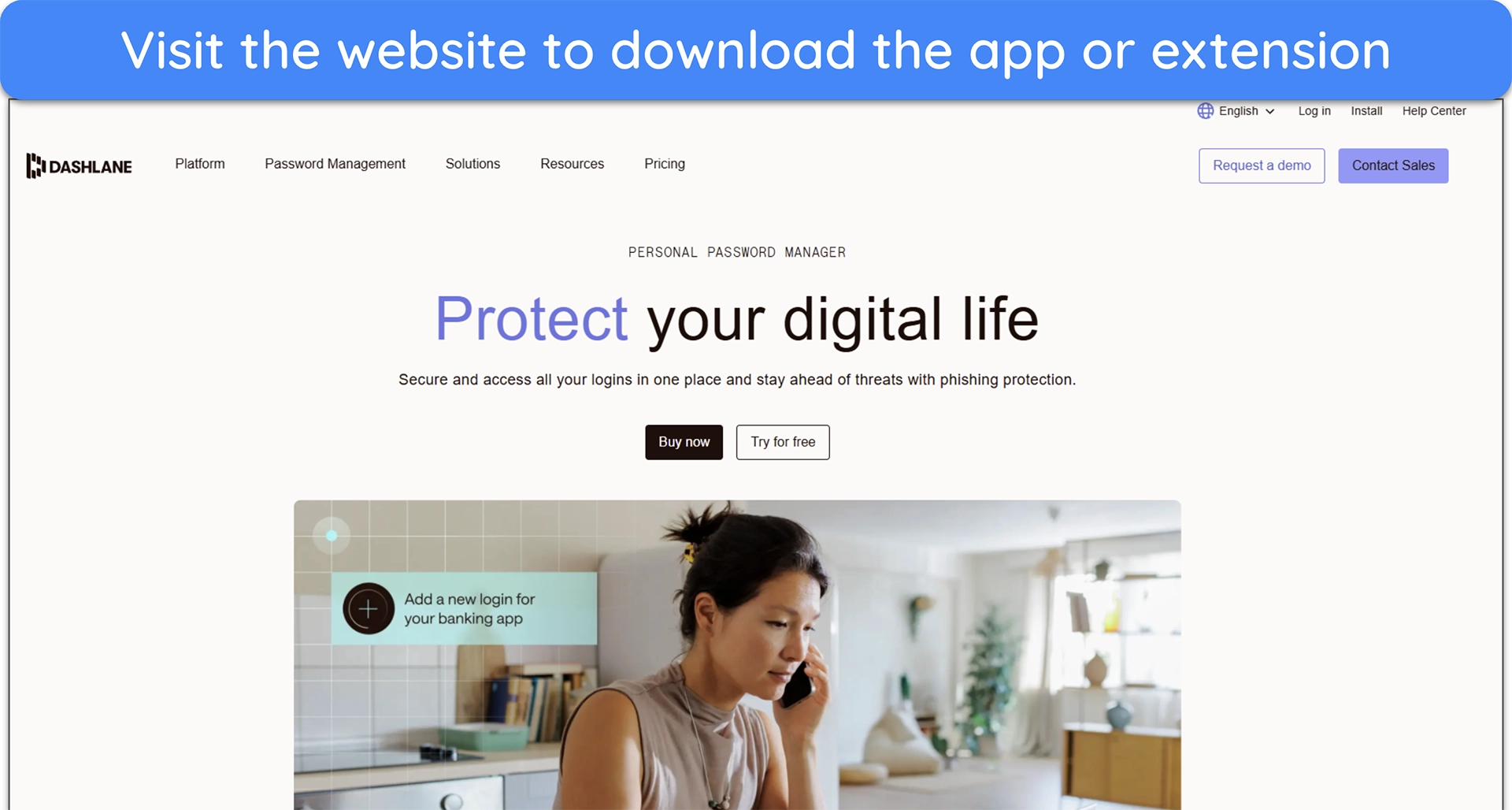
- Download Dashlane — Visit Dashlane’s website or your mobile app store and download the app or browser extension.
![Screenshot of Dashlane's website homepage]()
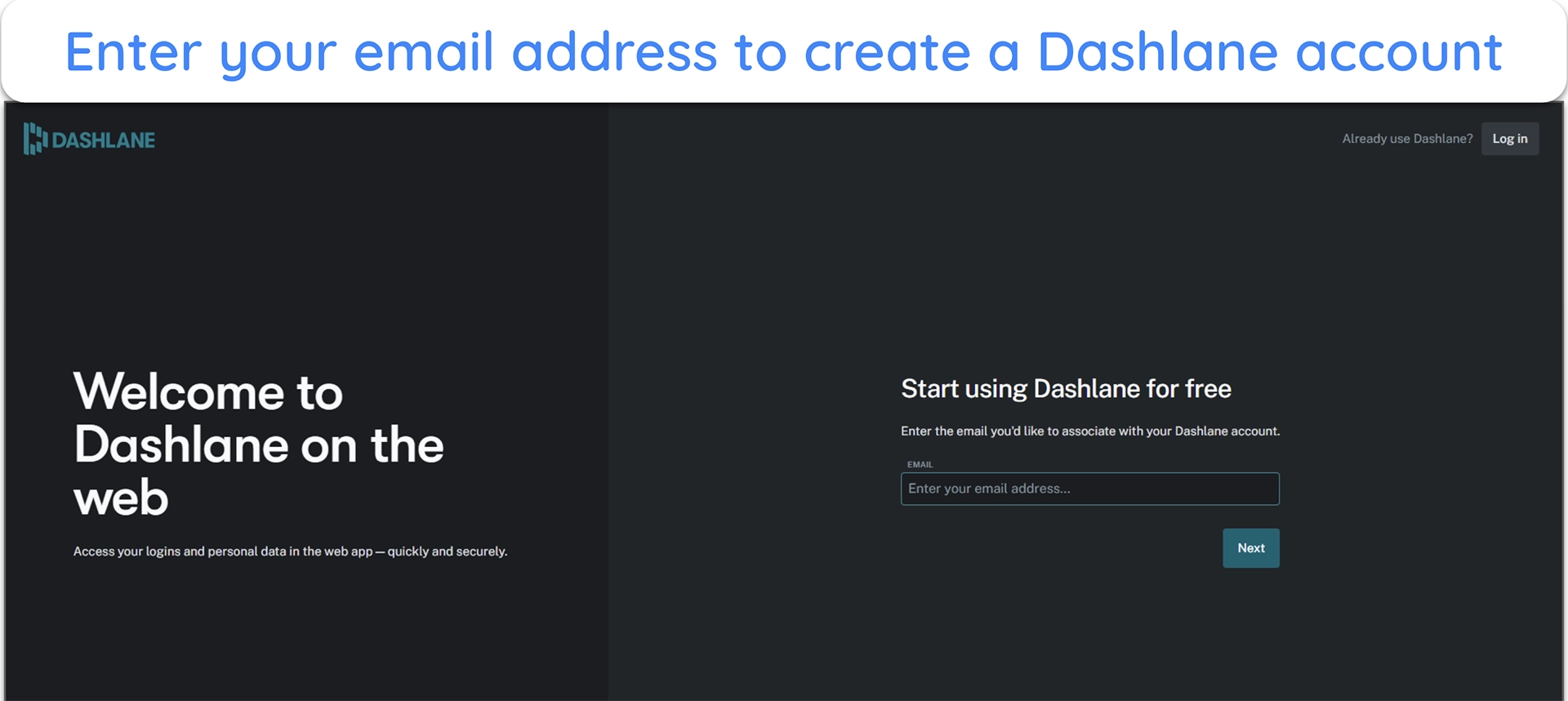
- Create your account — Set up a new account with your email address and create a strong master password. You can also enable biometric login for faster access on mobile.
![Image of Dashlane's account creation process, prompting the user to enter an email address]()
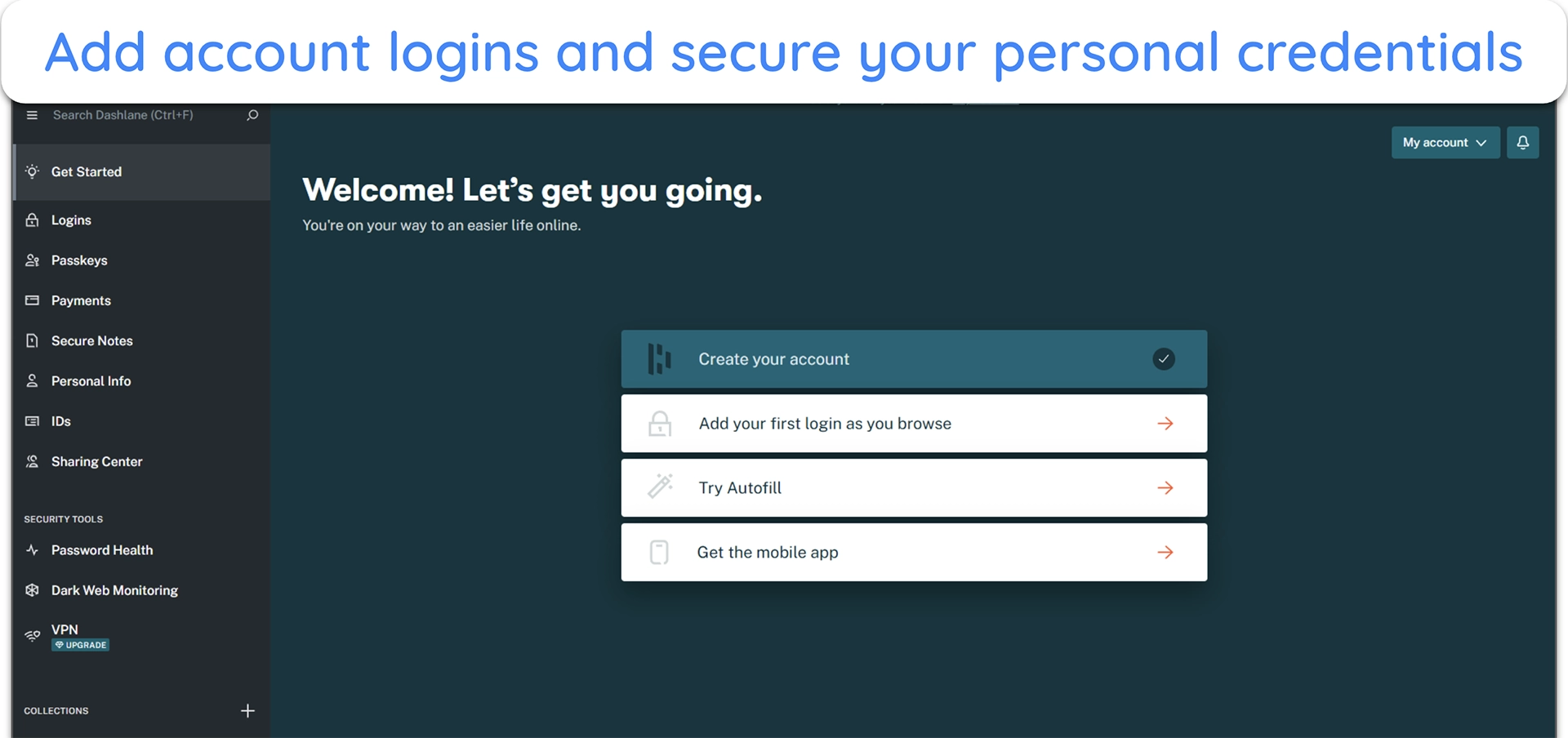
- Save and autofill passwords — Log in to your favourite websites and apps. Dashlane will prompt you to save your credentials and will autofill them the next time you visit.
![image of Dashlane's password manager ready to add logins and other personal information]()









Leave a Comment
Cancel