
 Speed
Speed
|
9.0 / 10 |
|---|---|
 Servers
|
9.0 / 10 |
 User Experience
|
8.0 / 10 |
 Support
|
9.0 / 10 |
 Pricing
|
9.0 / 10 |
Surfshark Review 2026: Cheap Price but Is It Any Good?
Reading time: 26 min
Last Updated: Jul 3, 2026
-

Written By Rosemary S Siluvai Anthony Cybersecurity Specialist
-
![Justyn Newman]()
Fact-Checked by Justyn Newman Former Lead Cybersecurity Editor

Surfshark Overview
Surfshark is considered one of the best-value VPNs, but I wanted to see if it’s actually good. To find out, I thoroughly tested its security, speed, streaming performance, and unique features to determine if it’s worth getting, even at the lower price.
After extensive testing, I found that Surfshark is absolutely worth the cost. It offers a vast network of servers, quality security, reliable streaming performance, and extra features you don’t get with other VPNs — Alternative ID, CleanWeb, and a built-in antivirus. There are minor concerns about its jurisdiction, but the strict no-logs policy makes up for these.
While it’s not as fast as top options like ExpressVPN, Surfshark is a solid choice if you want a reliable VPN at a bargain. Plus, you can try the Surfshark without risk, as it comes with a 30-day money-back guarantee, letting you get a full refund if you’re unsatisfied.
In a Rush? Here’s a 1-Minute Summary
- Works with most streaming sites. Surfshark reliably works with popular streaming platforms like Netflix, Disney+, Amazon Prime Video, and Max. Not every server worked, though. Check out all the streaming sites it works with.
- Fast speeds on nearby servers. You’ll get consistently fast speeds with Surfshark on nearby servers, but long-distance connections may be slower. Click here to see my speed test results.
- Effective security. Surfshark uses AES 256-bit encryption, RAM-based servers, a kill switch, and leak protection to keep you safe and private online. Read more about its security here.
- Easy-to-use apps for major operating systems. There are beginner-friendly apps for Windows, macOS, iOS, Android, and more. Here’s my review of each app.
- 24/7 customer support. It’s easy to contact Surfshark support whenever you need help. Learn about my experience with the VPN’s support team.
- One of the cheapest long-term VPNs. Surfshark’s generous discount on the long-term offer ensures you get great value. Discover the app’s pricing here.
Pros
- MultiHop routes traffic via 2 servers
- Turns you invisible on LAN networks
- GPS spoofing (Android only)
Cons
- Based in a 9-Eyes Alliance country
- Stores some data for 15 minutes
- Ad blocker sometimes disrupts sites
Get Surfshark for online safety
Surfshark Works With 28+ Streaming Platforms and More
Surfshark works with all major streaming services. This includes Netflix, Amazon Prime Video, Disney+, Hulu, and many others like the following:
| Crunchyroll | Paramount+ | ESPN | DAZN | Max |
| Channel 4 | fubo | Rai Play | RTÉ Player | Yle |
Note that not every server works with each streaming platform. For instance, my US colleague had to try multiple locations before finding a Boston connection that worked with their local Netflix library. If you don’t want to go through this hassle, CyberGhost has streaming-optimized servers designed specifically to work with major streaming services.
Works With Netflix
Surfshark is among the best VPNs for watching Netflix in the US and many other countries. During tests, my team and I found that it works with Netflix libraries in the US, UK, Germany, Australia, Canada, and France.

While it may take a few tries to find a Surfshark server working with your local Netflix region, libraries and videos load immediately once you find the right server. Plus, videos play in UHD quality from the beginning and I didn’t experience any buffering or quality drops during tests.
Works With Amazon Prime Video
Surfshark reliably works with Amazon Prime Video. The most reliable servers were in Boston, Miami, and New York in the US, as well as London and Manchester in the UK.

Works With BBC iPlayer
Most of Surfshark’s UK servers work with BBC iPlayer. My team and I found during tests that the London server was the most reliable, as it consistently loaded BBC iPlayer without issues. Plus, live sports broadcasts streamed without buffering and in UHD quality.

Works With Disney+
My colleagues in the US, UK, and Netherlands had no issues using Disney+ with Surfshark. The platform’s libraries loaded instantly when connected to the VPN and episodes of Secret Invasion loaded in UHD within a few seconds.

Overall, Surfshark delivers top-quality streaming performance. Most streaming platforms load without issues once you find the right server, and videos almost always play immediately. I also noticed that the video quality is consistently UHD, but this will vary based on how fast your base connection speed is.
Speed
- 9.0
/ 10
Speed — Fast Servers Across the Network
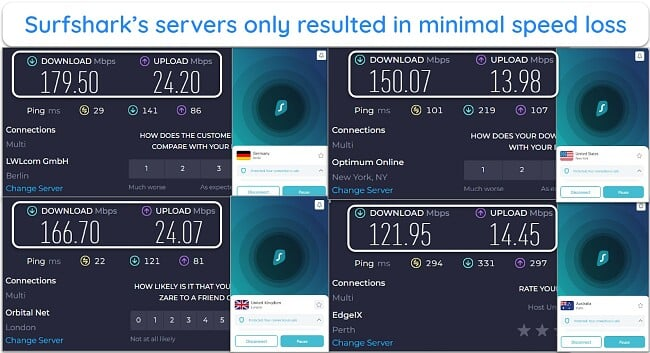
After extensively testing various servers in Surfshark’s network, my Ookla SpeedTest results showed that Surfshark maintains consistently fast speeds, even when you’re connected to servers that are a long distance from you.
Speed Test Results
Gaming Speed — Fast When Connected to Nearby Servers
To test Surfshark’s gaming performance, I connected to a London server, launched Left 4 Dead 2 on Steam, and ran a speed test. My ping was 32ms, which is very good for a server 300 miles from my location. The low ping ensured I didn’t experience any lag or delays while playing with my friends.

Unfortunately, ping increased significantly when connecting to long-distance servers in Australia, reaching 300ms. There are other VPNs that you can try to maintain lower pings on Call of Duty: Warzone and other fast-paced games, but you should note that it’s hard for any VPN to keep pings low on long-distance connections.







Why Most Speed Tests are Pointless & How We Correctly Test VPN Speeds
Speed determines how fast content uploads, so if you're torrenting or streaming, you want the speed to be somewhat identical to your regular internet speed. Since a VPN encrypts your data, it usually takes a bit longer to send your data back and forth, which can slow down your connection. However, if your ISP deliberately slows down your connection (also known as throttling) a VPN might increase your internet speed. Testing a VPN is somewhat pointless because new servers pop up and affect speed. Your speed can also differ according to your location, so your speed test might not match ours. Having said that, we tested the speed in numerous locations to provide you with the average.
![]() Servers
Servers
- 9.0
/ 10
Surfshark has an impressive server network. It covers 100 countries and has many P2P-compatible options. It even includes virtual servers in countries with invasive privacy laws.
Server Network — Global Network of 4,500+ Servers in 100 Countries
Thanks to its massive server network, it’s always easy to connect to a nearby Surfshark server. While it’s not the biggest network, it’s large enough to ensure you can find an uncrowded server at any time.
Surfshark has virtual servers in some countries, like India, Egypt, and Mexico, providing local IP addresses without needing to abide by the countries’ invasive privacy laws. This helps Surfshark to stand out — many VPNs remove local options entirely when local law changes threaten their ability to maintain no-log promises.
There are also free static servers in the US, UK, Netherlands, Japan, Singapore, and Germany, letting you use the same IP address every time. While they help access sites that are sensitive to IP changes, you should note that static IPs are shared by other users and can be flagged as belonging to a VPN quite easily.
Alternatively, you can try Surfshark’s dedicated IP addresses for a small fee. These are exclusive IP addresses only you can use — helpful for avoiding CAPTCHAs and VPN blocks since there are no other previous (suspicious) activities by another user.
Torrenting — Supports P2P Traffic
Surfshark offers P2P support without any data limits and is compatible with popular torrenting clients like qBittorrent and uTorrent. Plus, the app’s kill switch and leak protection ensure no one can snoop on your activities, even if the VPN connection drops unexpectedly.
I like that Surfshark automatically routes traffic through a P2P-compatible server when it detects P2P traffic. This was initially confusing, as the server on my app didn’t change when starting a torrent download. However, customer support confirmed that the traffic gets routed through a P2P server, even if the change doesn’t show in the app.

I even double-checked this myself. While I was connected to a server in Turkey, I ran tests on ipleak.net and saw that my IP address was still in Turkey, but the DNS server was changed to the Netherlands.
To avoid this confusion, you can connect to a P2P server, but these servers aren’t labeled or listed anywhere. To find them, simply type ‘P2P’ in the location menu’s search bar to see the servers that allow P2P traffic.

China — Surfshark Doesn’t Work Reliably in China
Despite the NoBorders mode that it claims to work in restrictive regions, Surfshark didn’t work in China. During testing, my colleagues could only connect to 1 server in Ireland, but it failed after 30 seconds. Even after troubleshooting, my colleagues couldn’t use Surfshark. A customer support agent recommended using the Shadowsocks protocol but that didn’t work either.
If this is crucial for you, I recommend ExpressVPN as it works reliably in China. It comes with a 30*-day money-back guarantee, so you can try it risk-free and get a refund with no questions asked. I don’t condone using a VPN to commit illegal acts, so please understand the local laws and know what’s allowed before connecting in China.
Security Features
Surfshark is among the best VPNs in 2026 for security, offering advanced features beyond the usual encryption, IP leak protection, and no-logs policy.
Encryption — Secures Traffic With Military-Grade Encryption
Surfshark uses the industry-leading encryption algorithm, AES-256, to protect your online data against hackers and online snoops. The military-grade cipher would take billions of years to decrypt with the current computers. It also uses a 2048-bit version of the RSA algorithm to secure data transmissions.
The encryption standard also supports Perfect Forward Secrecy to generate a unique session key and discard it once the session ends. By doing this, your privacy and security remain intact — even if an attacker gains access to the encryption keys, they cannot decrypt your VPN sessions in the past or future.
VPN Protocols — Choose Between OpenVPN, IKEv2, and WireGuard
- OpenVPN — one of the most secure protocols in the industry. It’s safe for online banking and shopping but can be slow. Anti-VPN networks usually block OpenVPN connections.
- WireGuard — lighter than OpenVPN but faster and more secure. Now includes post-quantum protection for future-proof security.
- IKEv2 — popularly used on mobile devices as it supports auto-reconnect during interruptions, especially when your device switches from cellular data to WiFi. It’s also fast and provides stable connections.
Kill Switch — Soft and Strict Options Provide More Flexibility
Surfshark has a kill switch on all its apps, but it’s not turned on by default. This feature blocks all internet traffic if the VPN disconnects, ensuring you don’t leak identifying information.
Unlike most VPNs, Surfshark gives you ‘soft’ and ‘strict’ kill switches to handle different network conditions. The strict kill switch only allows internet access when the VPN is connected. The soft version kills internet access if you lose connection by accident or your device is switching between networks.

Leak Protection — No DNS, WebRTC, or IP Address Leaks
I tested Surfshark’s built-in leak protection by connecting to random servers in the US, Australia, and Germany. I found that my actual IP address was never revealed on leak testing websites. Additionally, there were no WebRTC or DNS leaks.
Surfshark’s leak protection is equally effective on virtual servers. None of its virtual servers in Vietnam, India, Saudi Arabia, Argentina, or the Bahamas leaked during my tests.

Unfortunately, your IPv6 data may potentially leak with Surfshark, as it’s a new IP format that the VPN does not yet support. It’s better to disable IPv6 traffic on your device if your network supports it and you wish to use Surfshark.
Split Tunneling — Only on Windows and Android Apps
Surfshark’s split tunneling functionality is called Bypasser, and it’s useful for making traffic from specific websites and apps bypass the VPN connection. I could do this on my Windows laptop from the ‘Settings’ panel. Unfortunately, it’s not available for macOS and iOS devices.
Ad and Malware Blocker — CleanWeb Blocks Ads, Malware, and Trackers
Many premium VPNs now offer built-in blockers against ads, malware, and trackers, but not all of them work well. However, Surfshark’s CleanWeb is among the best tools in this category. It reliably blocks all pop-up, video, and banner ads on news sites like the Mirror and even on YouTube TV. Sites and videos also loaded faster as a result.

Alternative ID — Provides an Entire Alternative Persona for Online Use
Alternative ID is a unique Surfshark feature that can help improve your online anonymity further. It allows you to create a new persona, adding an extra layer of privacy to help prevent cyberstalking or identity theft.

The Alternative ID feature is accessible from Surfshark’s web portal and provides you with an alternative name, address, and email address to use online. You can also manually choose what email the alternative accounts’ emails are redirected to, so you’re not restricted to using the email you subscribed to Surfshark with.
Additionally, you can create an alternative US phone number, which can be helpful if you’re concerned about sharing your number while signing up on websites. Note that the alternative number feature costs extra, while the rest of the Alternative ID features are included with every Surfshark offer.
Additional Features — Plenty of Extras for Advanced Users
You’ll get many extra features with Surfshark, some focused on security and others on convenience. The key extra features in the app include the following:
- Camouflage and NoBorders Modes — obfuscates traffic to hide your VPN usage, letting you use Surfshark in restrictive countries.
- IP Rotator — changes your IP address every few minutes without dropping your connection to make tracking your activities harder.
- Dynamic MultiHop — encrypts your data twice for extra security by routing it through 2 servers of your choice instead of 1.
- GPS Override — updates your Android device’s location data to match the location of the server you’re connected to.
- Invisible to Devices — lets you become invisible to other devices on your Local Area Network (LAN) — available on Windows and Android devices.
- Pause VPN — allows you to disable the connection for 5 minutes, 30 minutes, or 2 hours.
- 2FA Authentication — asks for extra authentication upon login for added security.
- TrustDNS — a standalone app for iOS and Android devices that connects you to a public DNS server instead of a DNS server assigned by your ISP.
- Surfshark Search — provides an ad and tracker-free search engine that values your privacy.
- Incogni — deletes your data from online databases to minimize spam and marketing emails. Only available in the US, UK, the European Union, Switzerland, and Canada.
Privacy Features — Not the Most Reassuring Policy or Jurisdiction
Although Surfshark claims it doesn’t store data, its privacy policy shows it might do so temporarily. It’s also headquartered in a 9-Eyes Alliance country that shares online intelligence with other member countries.
No-Logs Policy — Claims No-Logs, but Stores Important Data for 15 Minutes
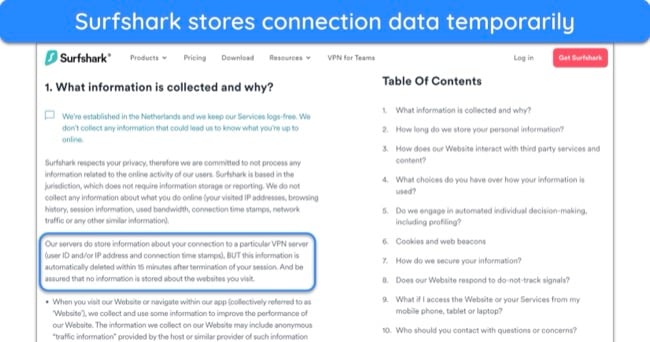
Going through Surfshark’s privacy policy, I found the opening promising, with the assurance it doesn’t collect or store identifiable data. However, further down, the VPN clarified that some information, like user ID, IP address, and connection timestamps are stored by the servers and deleted within 15 minutes after you terminate your session.
If your main reason for using Surfshark is privacy, this can be worrying, especially if you stay connected for many hours while downloading torrents or binge-watching TV shows. On the other hand, Surfshark uses RAM-based servers that delete all your data and browsing history as soon as they’re rebooted.
Additionally, Surfshark publishes a warrant canary on its website to indicate if the company has received a subpoena for user data from a government or law enforcement authority. While Surfshark stresses that the no-log policy prevents it from saving browsing history, I like knowing whether a security letter, gag order, or government warrant has been issued.
Company Jurisdiction — Based in the Netherlands
Surfshark was initially headquartered in the much more privacy-friendly British Virgin Islands but has since relocated to the Netherlands. Though it’s a member of the 9 Eyes Alliance, the Netherlands doesn’t have any data retention laws. This means that Surfshark is not obligated to log any data about you, so the no-log policy remains in effect.
Independent Audits — Passed Independent Security Audits
Like many VPNs, Surfshark has invested in third-party audits to verify its privacy and security claims. This includes an independent Mobile App Security Assessment. It passed all audits to provide the final confirmation and peace of mind that Surfshark doesn’t log data.
In 2018, Cure53 conducted an independent audit of Firefox and Chrome browser extensions. The German IT security firm also did an infrastructure audit and security assessment on Surfshark’s servers in 2021. Recently, Deloitte audited Surfshark’s no-log policy and validated the claim. I also read the reports and saw no significant security or privacy flaws.

Server Locations
![]() User Experience
User Experience
- 8.0
/ 10
Surfshark lets you connect unlimited devices at once, has apps for all major devices, and is easy to use. However, one downside I noticed is the frequent CAPTCHA challenges on websites when connected to Surfshark’s servers.
Simultaneous Device Connections — Use unlimited Devices Simultaneously
Unlike most premium VPNs with device limits, Surfshark protects unlimited devices with a single subscription. This lets you use the VPN anywhere you want without logging out of any device.
To test this, I connected to a UK server on a Windows laptop, 2 Windows desktops, an iPhone XS, a Samsung Galaxy smartphone, and 3 iPads. I didn’t have any connection issues or noticeable slowdowns on any device.
Device Compatibility — Native Apps for Major Operating Systems
I found that Surfshark is an excellent choice if you want to use a VPN on many devices. It has beginner-friendly apps for all major platforms, including Windows, macOS, iOS, and Android. Plus, it works on Linux, Android TVs, and Amazon Fire TVs. You can even set up the VPN on your smart TV or use it on game consoles that don’t have native VPN support.
Note that Surfshark features vary slightly based on the platform you’re using. The following are some of the main differences you can expect between each Surfshark app:
| Windows | macOS | iOS | Android | Linux | |
|---|---|---|---|---|---|
| Protocols | OpenVPN and WireGuard | OpenVPN and WireGuard | OpenVPN, WireGuard, and IKEv2 | OpenVPN, WireGuard, and IKEv2 | OpenVPN and WireGuard |
| NoBorders | ✔ | ✔ | ✔ | ✔ | ✘ |
| Split Tunneling (Bypasser) | ✔ | ✔ | ✔ | ✔ | ✘ |
| GPS Spoofing | ✘ | ✘ | ✘ | ✔ | ✘ |
| MultiHop | ✔ | ✔ | ✔ | ✔ | ✔ |
Browser Extensions — Lightweight Extensions for Chrome, Edge, and Firefox
You can install Surfshark’s browser extensions on Chrome, Edge, and Firefox. The extensions include CleanWeb 2.0, which has an excellent ad blocker, a cookie pop-up blocker, a data breach alert, and malware alert features.
The browser safety settings on Chrome are additionally strengthened, specifically the data breach and malware alert features. Previously, you could only see safety badges for a website and check for issues by visiting the link. Now, you can see the safety badge and a pop-up explaining if the site is safe or not directly in your Google Search results. So you don’t have to click the link to get this information, which is a much more secure approach.
I also like that Surfshark’s browser extension has the same interface as its desktop app, making it simple to use and navigate.

Most other VPN extensions are proxies, so I was glad to get VPN-level encryption with Surfshark’s browser extensions. However, it only secures the browser window — everything else is unsecured.
I was pleased to find Surfshark’s extensions work with streaming services when other proxy extensions struggle to connect. When tested with Netflix US, the browser extensions had no problem streaming content.
Ease of Setup & Installation — Effortless Installation
In my tests, Surfshark is easy to install and use. It takes only a few minutes to install the app and connect to a server once you’ve purchased a subscription.
I also tested Surfshark for a common issue users report — especially on Reddit — regarding Google blocklisting many servers. This can trigger CAPTCHA verification requests. During tests, my teammates and I tried over 20 Surfshark servers and experienced more CAPTCHA verifications compared to other top VPNs.
Besides the minor inconvenience of checking a box to pass verification, Surfshark’s user experience is excellent. The app has a user-friendly interface, and all main features are simple to find through the menu on the left-hand side. The mobile apps are equally intuitive, so you’ll have no trouble securing connections on mobile devices with Surfshark
3 Easy Steps to Install and Use the Surfshark App
- Get Surfshark. Visit the Surfshark website, subscribe to the VPN, download the setup, and install the app on your system.

![Screenshot showing how to subscribe to Surfshark through the official website]()
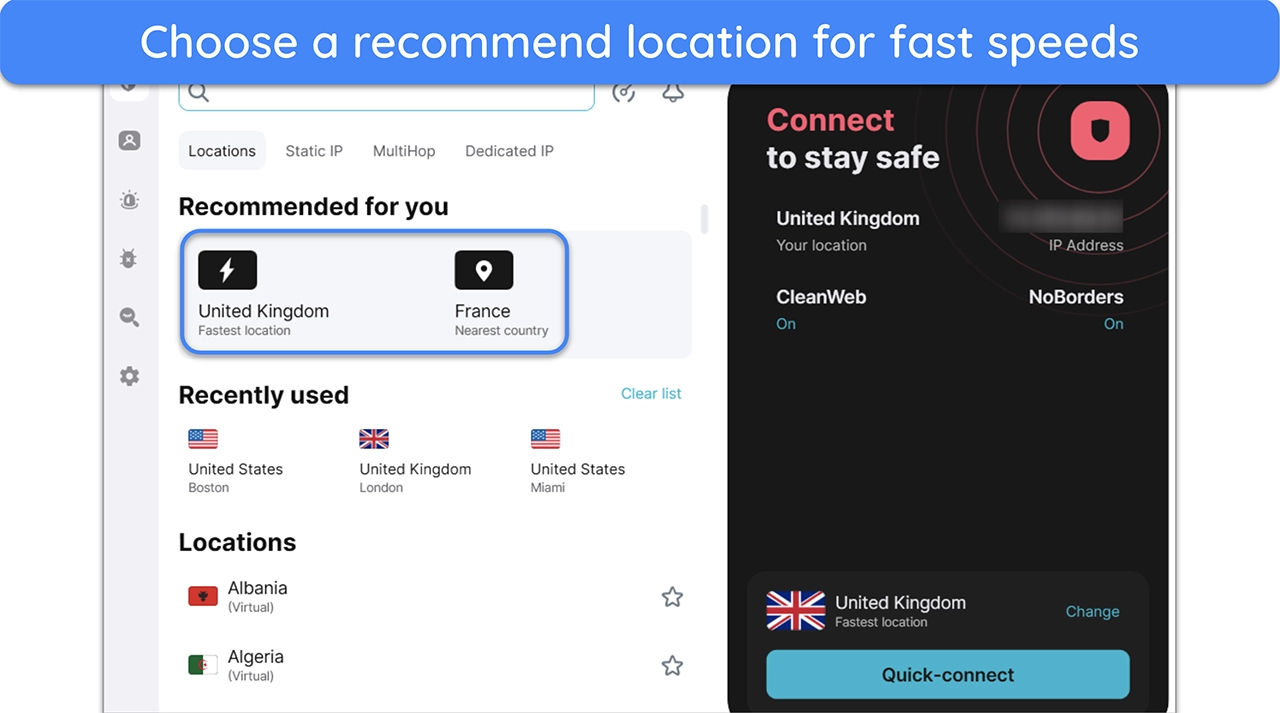
- Connect to a server. Open the Surfshark app, log in, and connect to your preferred server location. Using one of the recommended locations will ensure you get fast connection speeds.
![Screenshot showing how to connect to a Surfshark server]()
- Surf the web safely. Once connected, you can safely surf the web with an encrypted connection without worrying about compromising your privacy.
![]() Support
Support
- 9.0
/ 10
I was satisfied with Surfshark’s customer support. You can contact Surfshark over email, an online form, or live chat. The customer support team is available 24 hours a day, 7 days a week. However, if you prefer troubleshooting problems yourself, you can check out the website’s setup guides, tutorials, and FAQs.
I tested all the options to see how effectively the company resolved issues and found that live chat is the best way to receive fast help and detailed explanations. For most questions, however, I didn’t look much further than Surfshark’s website.
24/7 Live Chat — Get Help in Less Than a Minute
During my review, I tested the 24/7 live chat feature multiple times as I experienced minor technical difficulties. For example, a teammate couldn’t stream Netflix while connected to a US – Detroit server, and I struggled to connect to a specialty P2P server when torrenting. I was impressed by the friendly and fast responses.

Conveniently, Surfshark’s live chat is available directly on the Windows and Android apps. All you have to do is go to ‘Settings’ and then ‘Get Instant Help’ for one-to-one assistance. The app will then redirect you to the website where you can access the live chat feature.
Email Support — Good Alternative Support Channel
I also tested Surfshark’s email support by asking about some of its features. For comparison, I also used an email address not connected to my Surfshark account to see if there would be a difference in response time. Fortunately, there wasn’t and I received detailed responses in less than an hour every time.
Though the response times were fast, I recommend contacting Surfshark over 24/7 live chat. It’s much quicker as you can speak to a customer support representative directly, especially when you’re facing an urgent technical issue.
Comprehensive Online Resources and FAQs
Many VPNs have websites with help sections that are poorly organized that they’re barely usable. Surfshark’s “Help” section on its website is comprehensive and regularly updated. Most of the time, I didn’t need to contact customer service as I could find answers to my questions.
Topics are divided into 4 sections: installation, troubleshooting, account, and general inquiries. You can find step-by-step instructions for installation and troubleshooting, complete with screenshots and even some video tutorials.
How We Test Customer Support and Why Should You Care
We personally test the customer support team of every VPN we review. This means asking technical question through the live chat feature (where applicable) and measuring the response time for email questions. Whether you need to connect to a specific server, change your security protocol, or configure a VPN on your router, finding a VPN with quality customer support should be important to you.
![]() Pricing
Pricing
- 9.0
/ 10
Surfshark is among the most affordable VPNs on the market. It’s available as a 1-month, 1-year, or 2-year purchase. I recommend going for Surfshark’s longest-term plan to get the best deal.
There are 3 different tiers available for Surfshark purchases — Surfshark Starter, Surfshark One, and Surfshark One+. The difference between them is the number of features included. The basic Starter option includes a VPN connection, ad blockers, and Alternative ID.
One thing to remember is that Surfshark’s prices go up significantly upon renewal, often by over 70%. At its premium renewal rate, there are better services than Surfshark. The 1-month option is also among the most expensive among competitors. If you want a monthly subscription, check out these VPNs with the best month-to-month prices.
Surfshark One and One+
The Surfshark Starter option only includes the VPN and alternative ID features, but you can get access to many other useful tools with Surfshark One and One+. The following table highlights some of the key differences between each of these options:
| Surfshark Starter | Surfshark One | Surfshark One+ | |
|---|---|---|---|
| VPN | ✔ | ✔ | ✔ |
| Ad Blocker | ✔ | ✔ | ✔ |
| Alternative ID | ✔ | ✔ | ✔ |
| Antivirus | ✘ | ✔ | ✔ |
| Data Leak Alerts | ✘ | ✔ | ✔ |
| Tracking and Ad-free Surfshark Search | ✘ | ✔ | ✔ |
| Incogni Data Removal | ✘ | ✘ | ✔ |
Of all options, I consider Surfshark One to be the best overall value — it includes most of the key features at a slight price bump from Starter. However, Surfshark One+ may be worth considering if you’re worried about your personal data appearing on people-search websites.
Payment Methods — Wide Range of Options, Including Cryptocurrency
You can pay with credit cards (Visa, MasterCard, American Express, and Discover), cryptocurrencies (Bitcoin, Ethereum, and Ripple), Amazon Pay, Google Pay, PayPal, and Sofort. If you want to use Surfshark anonymously, sign up with a throwaway email address and pay with cryptocurrency.
Note: Surfshark doesn’t accept payments through QIWI, so if you’re in Russia, you can still use crypto to pay with a layer of anonymity.
Free Trial — Available for Android, iOS, and macOS
Surfshark offers a 7-day free trial on Android, iOS, and macOS apps. You can only get the free trial if you download the app from the Google or Apple app stores. However, you can use the same trial on your Windows device by logging in with the credentials you used to sign up on another device.
30-Day Money-Back Guarantee
If you’re unsure if Surfshark is suitable for you, the 30-day money-back guarantee for new subscribers lets you try the app risk-free. If you aren’t totally satisfied with Surfshark before the end of this period, simply request a refund via 24/7 live chat or send an email to the customer support team.
I tested the money-back guarantee by signing up for 1 month and requesting a full refund via live chat before 30 days were up. The agent asked why I wanted to cancel and offered to troubleshoot, but they eventually approved my request when I insisted I’d like a refund.
Surfshark has the following offers
Final Verdict
Overall, Surfshark is a great VPN that might not be #1 but is worth considering if you’re looking for value. It’s secure, fast, and works reliably with many streaming websites. Additionally, it’s one of the most feature-rich VPNs available, offering an antivirus, Alternative ID, and CleanWeb to set itself apart from other services.
The only noteworthy downside is that you may experience more CAPTCHA verifications when connected to Surfshark compared to other apps. This is a minor inconvenience, and there’s even a dedicated IP address option that helps you resolve this at a small fee.
You can also try Surfshark risk-free. The app’s 30-day money-back guarantee lets you get a full refund if you’re unsatisfied with the performance. Plus, macOS, iOS, and Android users can get a 7-day free trial by downloading Surfshark from their respective app stores.
FAQs About Surfshark
Is Surfshark good?
Can I use Surfshark for free?
Is Surfshark really safe?
Does Surfshark work with streaming platforms like Netflix and Amazon Prime Video?
Can I use Surfshark on all my devices?
Is Surfshark better than ExpressVPN?
Not quite. While Surfshark is a solid VPN, offering reliable speeds, security, and streaming performance, it’s not as good as ExpressVPN in some areas. For instance, Surfshark’s connection speeds are slower on long-distance servers, while ExpressVPN maintains consistently fast speeds across its entire network.
To learn more, read about ExpressVPN in our in-depth review.
Is Surfshark a Chinese company?



Editor’s Note: We value our relationship with our readers, and we strive to earn your trust through transparency and integrity. We are in the same ownership group as some of the industry-leading products reviewed on this site: ExpressVPN, CyberGhost, Private Internet Access, and Intego. That said, our detailed reviews follow a strict methodology that examines all relevant performance factors to help you arrive at your own informed conclusion.

| Netherlands | |
| 2018 | |
| No | |
| Unlimited | |
| 30 days guaranteed |