Dashlane vs Keeper 2026: Latest Test Results
Reading time: 17 min
First published: May 18, 2024
Updated 3 times since publishing
-
![Kate Hawkins]()
-
![Sarah Frazier]()
Fact-Checked by Sarah Frazier Former Content Manager


Short on time? Here’s our verdict: Dashlane is the overall winner between these 2 password managers. It offers better value for money, a superior free plan, a VPN, and an innovative auto-fill that can detect suspicious URLs.
Dashlane and Keeper are two of the most trusted password managers, but they take different approaches. Dashlane focuses on convenience and bundled value with features like a built-in VPN, phishing protection, and dark web monitoring. Keeper offers great customization, enterprise compliance, and flexible sharing options like One-Time Share links.
Looking at our test results, I found both apps highly secure and privacy-focused — and Dashlane is the better choice for most users. Keeper is worth considering for businesses due to its strict compliance and advanced admin tools. However, Dashlane is easier to use, includes more features in its plans, and comes with a 30-day money-back guarantee.
Try Dashlane risk-free for 30 days
No Time? Here’s a 1-Minute Summary of Category Winners
While both Dashlane and Keeper are excellent password managers, Dashlane is the better all-round choice. It delivers more value, offers phishing protection in autofill, and has beginner-friendly apps — better for everyday use. Keeper stands out for its enterprise features, versatile sharing, and broader device support.
 |
 |
|
| Security | AES-256 encryption, zero-knowledge, phishing protection; fewer MFA options | AES-256 encryption, zero-knowledge, broader MFA + compliance certifications |
| Password Storage | Unlimited storage, user-friendly generator, strong auditing; no emergency access | Unlimited storage, customizable vault, One-Time Share, emergency access |
| Privacy |
Zero-knowledge, SOC 2, ISO 27001, GDPR, publishes some open-source code Zero-knowledge, SOC 2, ISO 27001, GDPR, publishes some open-source code Intuitive apps and extensions, includes VPN and dark web monitoring Live chat (limited hours), email, phone for business |
Zero-knowledge, SOC 2, ISO 27001, GDPR, HIPAA, PCI DSS, FedRAMP, closed source |
| Ease of Use | Intuitive apps and extensions, includes VPN and dark web monitoring | Functional native apps; some key features are paid add-ons |
| Customer Service |
Live chat (limited hours), email, phone for business |
24/7 live chat, phone, email, dedicated enterprise support |
| Plans & Pricing |
$2.71/month Premium plan, $3.75/month Family plan |
$3.33/month Personal plan, $7.08/month Family plan |
Jump to see a full comparison of features
What to Look for When Comparing Password Managers
Choosing the best password manager means looking beyond basic storage. Here are the key factors to consider when comparing Dashlane and Keeper:
- Security — Strong encryption, two-factor authentication, and zero-knowledge architecture are must-haves. Advanced options like passwordless login and compliance with standards such as SOC 2 or GDPR matter for business users.
- Password Storage — Look for a secure vault, password generator, and auditing tools. Features like emergency access, secure sharing, and easy migration from another manager can make everyday use much smoother.
- Auto-Save and Fill — A reliable manager should recognize forms correctly, work across all major browsers, and protect against phishing attempts.
- Privacy — Independent audits, a transparent privacy policy, and clarity on data storage locations build trust.
- Ease of Use — Quick setup, an intuitive interface, and seamless syncing across devices ensure you don’t waste time managing your passwords.
- Extra Features — Tools like Dashlane’s VPN and dark web monitoring or Keeper’s secure file storage and encrypted messaging add value beyond basic password protection.
- Customer Service — Support channels matter, but speed and helpfulness are what really count. Enterprise users may also need dedicated assistance.
- Plans and Pricing — Compare what’s included in each plan. Family and business tiers often provide the best value, especially with long-term subscriptions or per-user pricing for teams.
1. Security — Keeper Wins, But It’s Close
Both Dashlane and Keeper have the necessary features for safe password management, like strong, zero-knowledge encryption. However, Keeper edges ahead with broader multi-factor authentication options and enterprise compliance certifications.
Encryption — Tie
Dashlane and Keeper both implement AES-256 encryption with a zero-knowledge architecture — this means your stored data is unreadable to anyone but you. They also secure vault data with PBKDF2 hashing, which prevents brute-force attacks. Both solutions meet the highest industry standards.
Encryption Winner: Tie
Two-Factor Authentication (2FA) — Keeper Has More Options
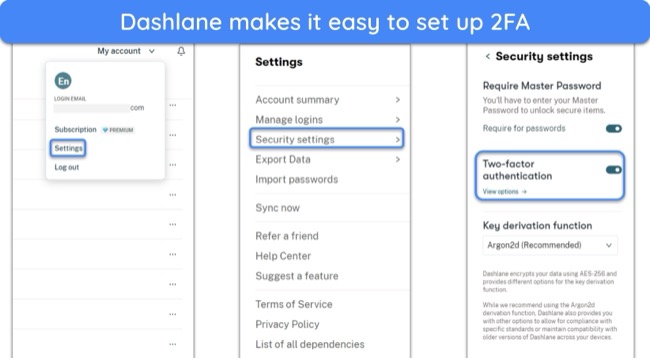
Dashlane supports 2FA via authenticator apps and U2F keys, and it’s simple to set up 2FA options in the security settings.
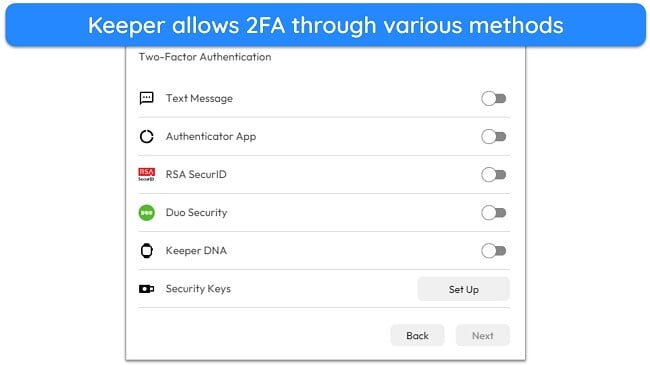
However, Keeper goes further with biometric logins, SMS codes, Duo, and single sign-on (SSO) options for enterprises. This makes Keeper the more versatile choice for authenticating logins.
Two-Factor Authentication (2FA) Winner: Keeper
2. Password Storage — Dashlane Wins for Everyday Use
Both managers provide excellent storage, but Dashlane’s seamless password generation and straightforward organization make it more practical for daily use. Keeper shines when it comes to flexibility and advanced options.
Password Vault — Keeper Offers More Versatile Storage
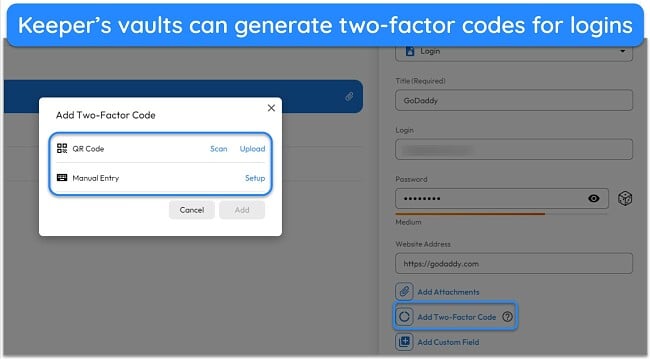
Both services provide unlimited password storage, but Keeper’s vault is more comprehensive. It supports entries for passwords, identities, credit cards, and sensitive documents, with customizable fields that adapt to specific needs. Keeper also integrates TOTP code generation, letting you use the vault as an authenticator.
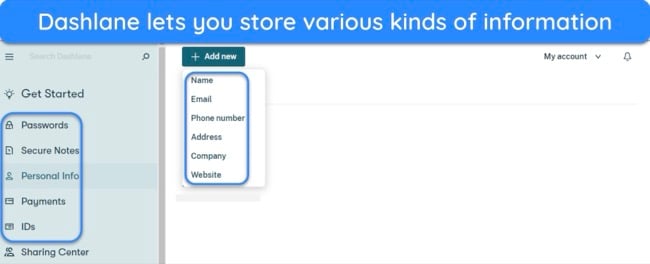
Dashlane’s vault is simpler, storing passwords, notes, identities, and payment details. It also offers TOTP for stored logins, but its organizational options aren’t as flexible as Keeper’s.
Password Vault Winner: Keeper
Password Generator — Dashlane Makes It Easier to Create Strong Passwords
Dashlane’s generator is tightly integrated into its workflow. It automatically suggests secure replacements for weak or reused passwords and makes generation accessible from the browser extension or app. You can even retrieve recently generated passwords if you forget to save them.
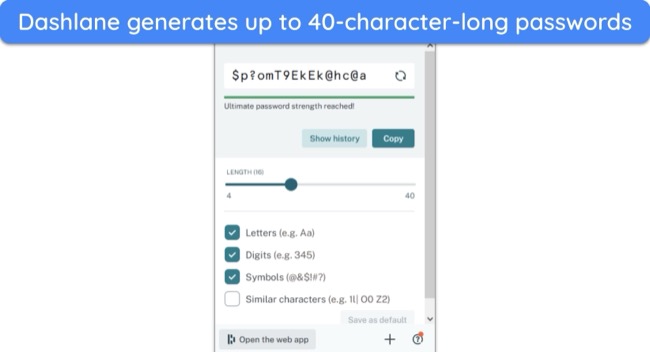
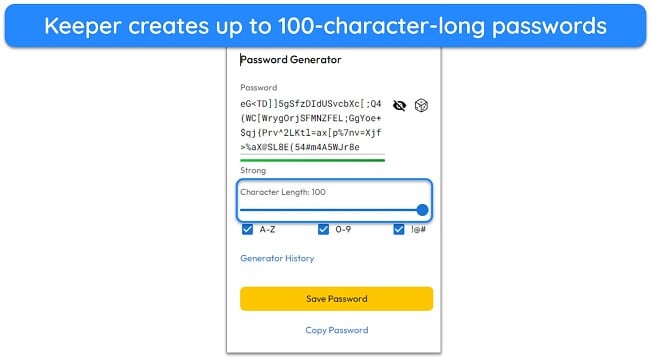
Password Generator Winner: Dashlane
Password Auditing — Dashlane Has the More Comprehensive Tool
Both Dashlane and Keeper analyze your vault for weak, reused, or old passwords, and each provides a security score to show overall password health. However, Dashlane goes further with its Password Health feature, which also identifies compromised accounts, shows where the breaches occurred, and when the data was exposed.
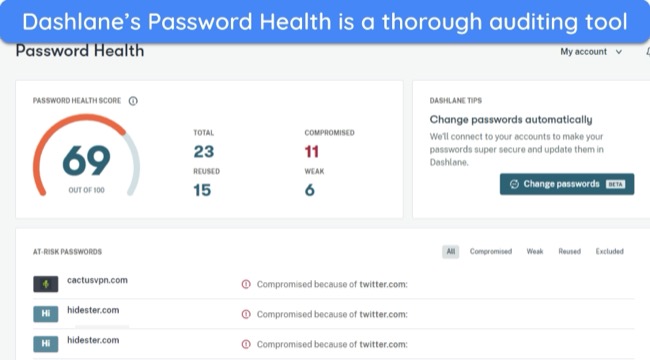
Keeper’s Security Audit is still useful, but doesn’t highlight compromised credentials in the same way unless you add its BreachWatch monitoring service. This makes it less complete for everyday auditing.
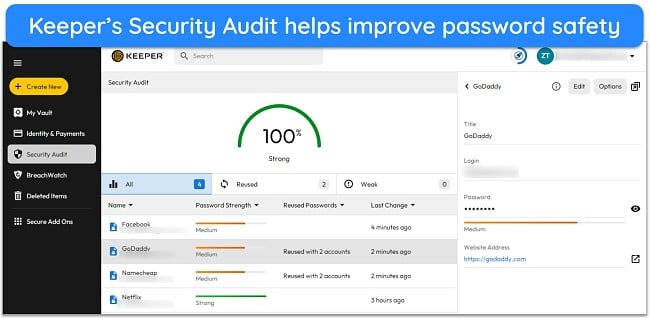
Password Auditing Winner: Dashlane
Password Sharing — Keeper Offers More Flexible Options
Both Dashlane and Keeper let you securely share passwords and sensitive data, but Keeper provides more flexibility.
Keeper’s One-Time Share feature allows you to send encrypted links that recipients can open without having a Keeper account, and you can set the links to expire after a chosen time. Keeper also supports traditional app-to-app sharing with granular permission controls, making it well-suited for teams.
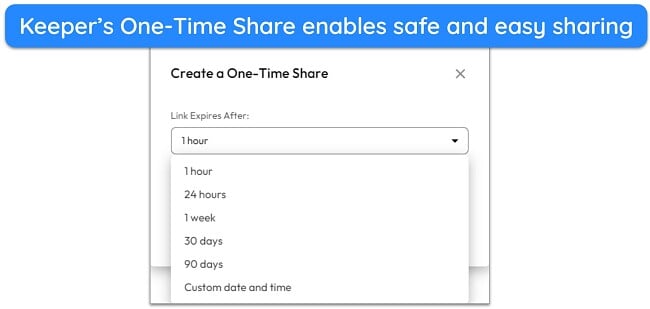
Dashlane’s sharing is easy to use but limited to other Dashlane users. While you can set basic permissions like view or edit access, it lacks the convenience of link-based sharing.
Password Sharing Winner: Keeper
3. Auto-Save and Fill — Dashlane Is More Secure
Both password managers make it easy to save new credentials and automatically fill in login details or forms. In my tests, each reliably prompted me to save information when creating new accounts and offered to auto-fill usernames and passwords on return visits.
Dashlane takes this feature a step further with built-in phishing protection. If you try to fill in credentials on a suspicious site with a mismatched URL, Dashlane warns you before proceeding. This adds an extra layer of security against credential theft. I also found its form recognition slightly more accurate across different websites and web apps.
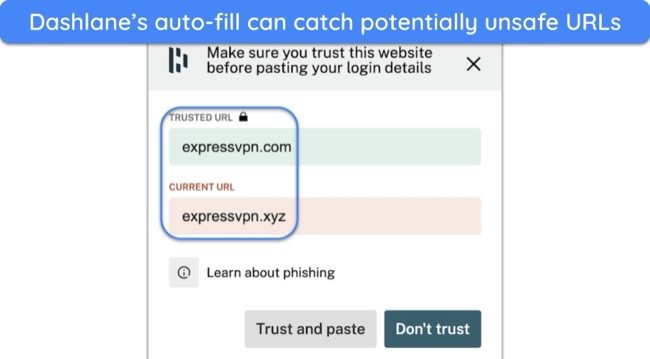
Keeper’s auto-save and fill worked smoothly as well, with prompts appearing consistently during logins and sign-ups. It performs reliably across browsers and mobile apps, but it lacks Dashlane’s phishing alerts.
Auto-Save and Fill Winner: Dashlane
4. Privacy — Dashlane Has Greater Transparency
Both Dashlane and Keeper are built with zero-knowledge architecture and AES-256 encryption, ensuring only you can access your vault data. They’re also GDPR-compliant and have cleared independent security audits, so you can trust them to handle sensitive information safely.
Keeper goes further in compliance, holding a broader range of certifications, including SOC 2 Type 2, ISO 27001, HIPAA, PCI DSS, and FedRAMP. This makes it especially appealing to enterprises with strict regulatory requirements.
Dashlane distinguishes itself with transparency. It has published the source code for its mobile apps and browser extensions, allowing independent researchers to verify its claims. Keeper doesn’t provide the same level of code openness, relying instead on external audits.
Both apps are highly privacy-focused, but Dashlane edges ahead by making parts of its code open-source, giving users more visibility into how their data is protected.
Privacy Winner: Dashlane
5. Ease of Use — Dashlane Is More Intuitive
Dashlane is the better overall option when it comes to ease of use. Its apps and browser extensions are simple to set up and navigate, making it easy even for first-time users to get started. The interface feels more modern and polished than Keeper’s, and essential features like autofill and password generation work seamlessly in the background.
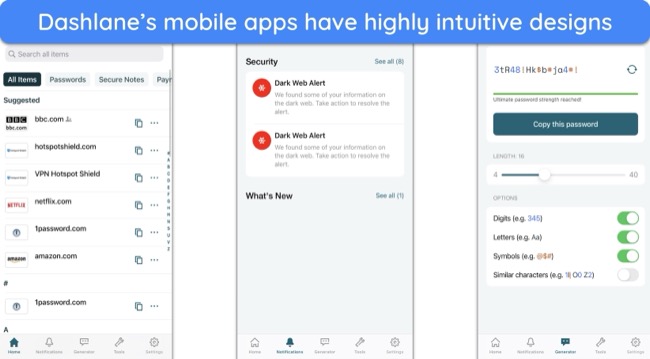
Keeper has native apps for all major platforms and reliable syncing across devices. However, its design is more utilitarian, and features like dark web monitoring and expanded file storage require extra payments — Dashlane includes similar functionality in its premium plans.
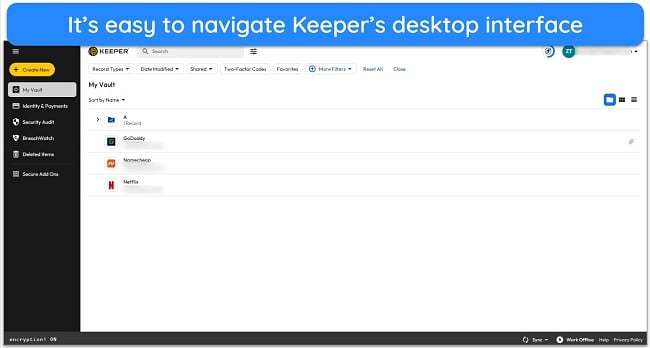
It’s also worth noting that Keeper’s apps just aren’t as easy to use as Dashlane’s. Some features are tricky to locate or require navigating through several menus — something Dashlane avoids with its clear and intuitive interface.
Extra Features — Dashlane Bundles More Value
Both Dashlane and Keeper go beyond basic password storage with tools designed to improve security and convenience. Dashlane stands out for including more of these features in its standard plans, while Keeper often charges extra for its most advanced options.
Dashlane’s extra features include:
- VPN (Hotspot Shield-powered): Protects your browsing with AES-256 encryption.
- Dark web monitoring: Scans for leaked credentials on paid plans.
- Passkey support: Allows passwordless logins on supported websites.
- Secure storage: 1 GB of encrypted file storage via Secure Notes.
- Import/export tools: Make switching between managers simple.
Note: Dashlane no longer offers emergency access.
Keeper’s extra features include:
- KeeperChat: Encrypted messaging for secure communication.
- Emergency access: Lets trusted contacts into your vault if needed.
- Passkey support: Enables passwordless login on compatible sites.
- Import/export tools: Help migrate credentials easily.
- BreachWatch (paid add-on): Dark web monitoring for leaked credentials.
- Secure file storage (paid add-on): Up to 100 GB or more of encrypted storage.
Overall, Dashlane includes more extras in its base plans, especially the VPN and dark web monitoring. Keeper offers broader tools but locks useful features behind paid add-ons.
Extra Features Winner: Dashlane
Device Compatibility — Keeper Supports More Native Apps
Both Dashlane and Keeper deliver reliable support across major platforms, but Keeper offers more native applications and flexibility for all use cases.
| Dashlane | Keeper | |
| Windows | Browser extensions | Native app & browser extensions |
| macOS | Native App & Browser extensions | Native app & browser extensions |
| Linux & ChromeOS | Browser extensions | Native app & browser extensions |
| iOS | Native app | Native app |
| Android | Native app | Native app |
| Browsers | Chrome, Firefox, Edge, Safari, Opera, Brave | Chrome, Firefox, Edge, Safari, Opera, Brave |
| Smartwatch | – | Apple Wear, Watch OS |
Keeper offers native apps on every major desktop and mobile platform, plus smartwatch integration and advanced autofill (KeeperFill) functionality. Dashlane lacks native desktop versions but still works across browsers and has apps for mobile devices.
Device Compatibility Winner: Keeper
6. Customer Service — Keeper Provides More Reliable Support
Both Dashlane and Keeper make it easy to get help through knowledge bases, troubleshooting guides, and direct support channels. However, Keeper is more accessible and responsive.
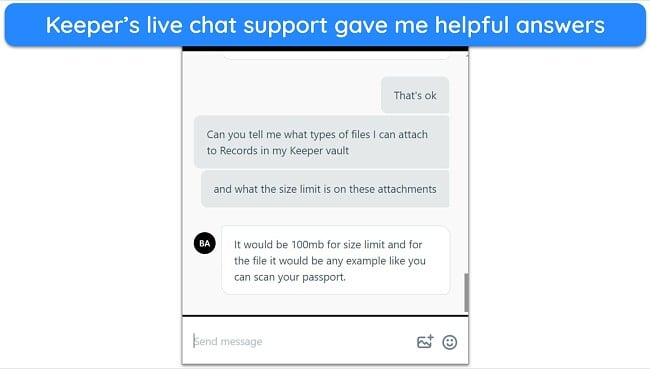
Keeper offers 24/7 live chat, email, and phone support. I found its chat agents quick to respond — usually within a couple of minutes — and knowledgeable about both personal and business features. Enterprise customers can also access dedicated support, including account managers and SLAs, adding another layer of reliability.
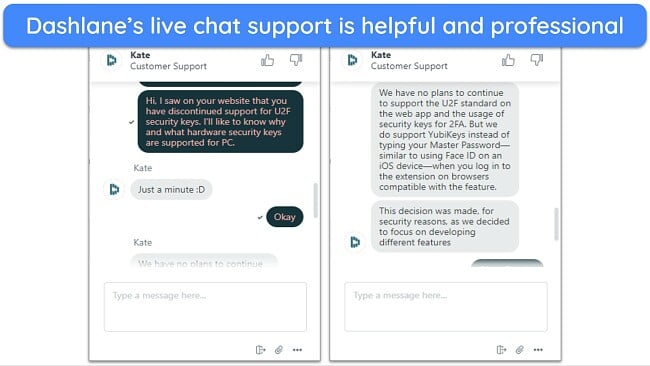
Dashlane provides live chat and email, plus phone support for business accounts. However, its live chat is limited to Monday through Friday, 9am to 6pm EST. When I tested it, agents were polite and helpful, but the restricted hours could be frustrating if you need assistance outside of the workweek or in a different time zone.
Customer Service Winner: Keeper
7. Plans and Pricing — Dashlane Delivers Better Value Overall
Both password managers come with multiple subscription options, but Dashlane includes more features in its plans while Keeper often charges extra for key tools.
Price — Dashlane Gives You More For the Price
Dashlane starts at $2.71/month (billed annually) for its Premium plan. The price includes valuable extras like a built-in VPN, dark web monitoring, passkey support, and 1GB of secure file storage. The Friends & Family plan costs $5.25/month (billed annually) and covers up to 10 users, making it one of the best-value family subscriptions on the market.
Keeper is cheaper at first glance, with its Personal plan costing $3.33/month (billed annually), but you’ll need to pay extra for important Keeper features like BreachWatch and expanded file storage. The Family plan costs $7.08/month (billed annually) and only supports 5 private vaults.
Price Winner: Dashlane
Free Version — Keeper Still Has a Limited Free Plan
Dashlane no longer has a free plan — support for it ended in September 2025, so you’ll need a paid subscription to use the service. You can try Dashlane for free for 30 days as it has a free trial.
Keeper still provides a free version, but it’s limited to storing passwords locally on a single mobile device with no cloud sync. While this is far from a complete solution, it’s a way to test how the app works before purchasing a plan. If you want to test the full service, Keeper also has a 30-day free trial.
Free Version Winner: Keeper
Money-Back Guarantee — Only Dashlane Has a Money-Back Guarantee
Dashlane provides a 30-day money-back guarantee on its paid plans, so you can get a full refund within 30 days of subscribing or renewal.
Keeper does not offer a money-back guarantee, and terms clearly state that once the software is delivered in full, no refunds will be issued — even if the software is unused.
Money-Back Guarantee Winner: Dashlane
And the Winner Is… Dashlane
Dashlane is the overall winner for everyday users, while Keeper is better suited for businesses and power users who need advanced controls and compliance.
|
|
|
| Encryption | AES-256, zero-knowledge | AES-256, zero-knowledge |
| Two-Factor Authentication (2FA) |
Authenticator apps, U2F keys |
Authenticator apps, SMS, Due, SSO, KeeperDNA |
| Password Storage | Stores passwords, identities, payment details, notes, TOTP | Stores all types of data with custom fields, TOTP support |
| Auto-Save and Fill | Reliable autofill with phishing protection | Autofill across platforms |
| Password Generator | Up to 40 characters, easy to customize | Up to 100 characters, less intuitive to use |
| Privacy |
Zero-knowledge, GDPR, SOC 2, ISO 27001, partial open-source code |
Zero-knowledge, SOC 2, ISO 27001, HIPAA, PCI DSS, FedRAMP |
| Password Auditing | Flag weak, reused, old, and compromised passwords (with breach details) | Flags weak, reused, and old passwords; BreachWatch add-on needed for compromised accounts |
| Password Sharing | Share securely with other Dashlane users | Share with other users + One-Time Share via expiring links |
| Ease of Use | Modern, intuitive apps and extensions | Functional, but some features are harder to find; more add-ons |
| Extra Features |
VPN, dark web monitoring, passkeys, 1GB storage |
BreachWatch (add-on), KeeperChat, larger storage (add-on), passkeys |
| Device Compatibility | Browser extensions for desktop, native iOS and Android apps | Native apps for all major platforms + smartwatch support |
| Customer Service |
Email, live chat (limited hours), phone (business only) |
24/7 live chat, email, phone, dedicated enterprise support |
| Price | Premium plan, includes all features: $2.71/month | Personal plan, optional add-ons available: $3.33/month |
| Free Version | ✘ | Limited; mobile only, no sync |
| Money-Back Guarantee | 30-days | ✘ |
Keeper is highly customizable, with strong compliance credentials, flexible sharing options, and broader device compatibility. It’s appealing for businesses looking for advanced admin controls and affordable per-user pricing. Plus, you can try it for free for 30 days with a free trial.
However, Dashlane is the better choice for most individuals and families. Its streamlined apps are easier to use, and its plans include more features upfront. It also comes with a 30-day money-back guarantee, giving you peace of mind when you try it yourself.
Overall Winner: Dashlane
How to Use Dashlane on Your Device
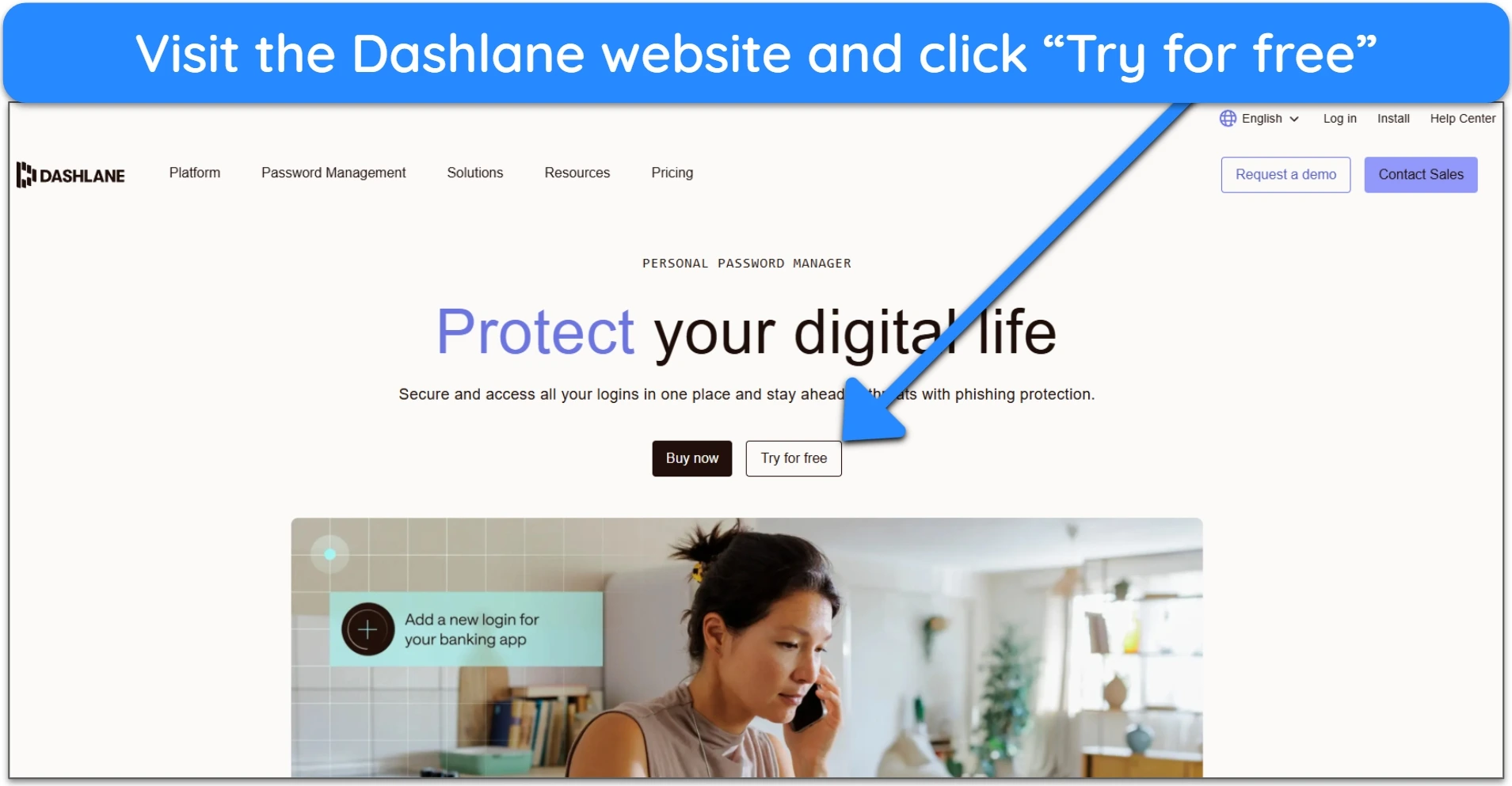
- Visit the Dashlane website. Once there, you can choose a subscription plan or try Dashlane for 30 days by clicking or tapping “Try for free.”
![Image of Dashlane's personal password manager home page, highlighting the]()
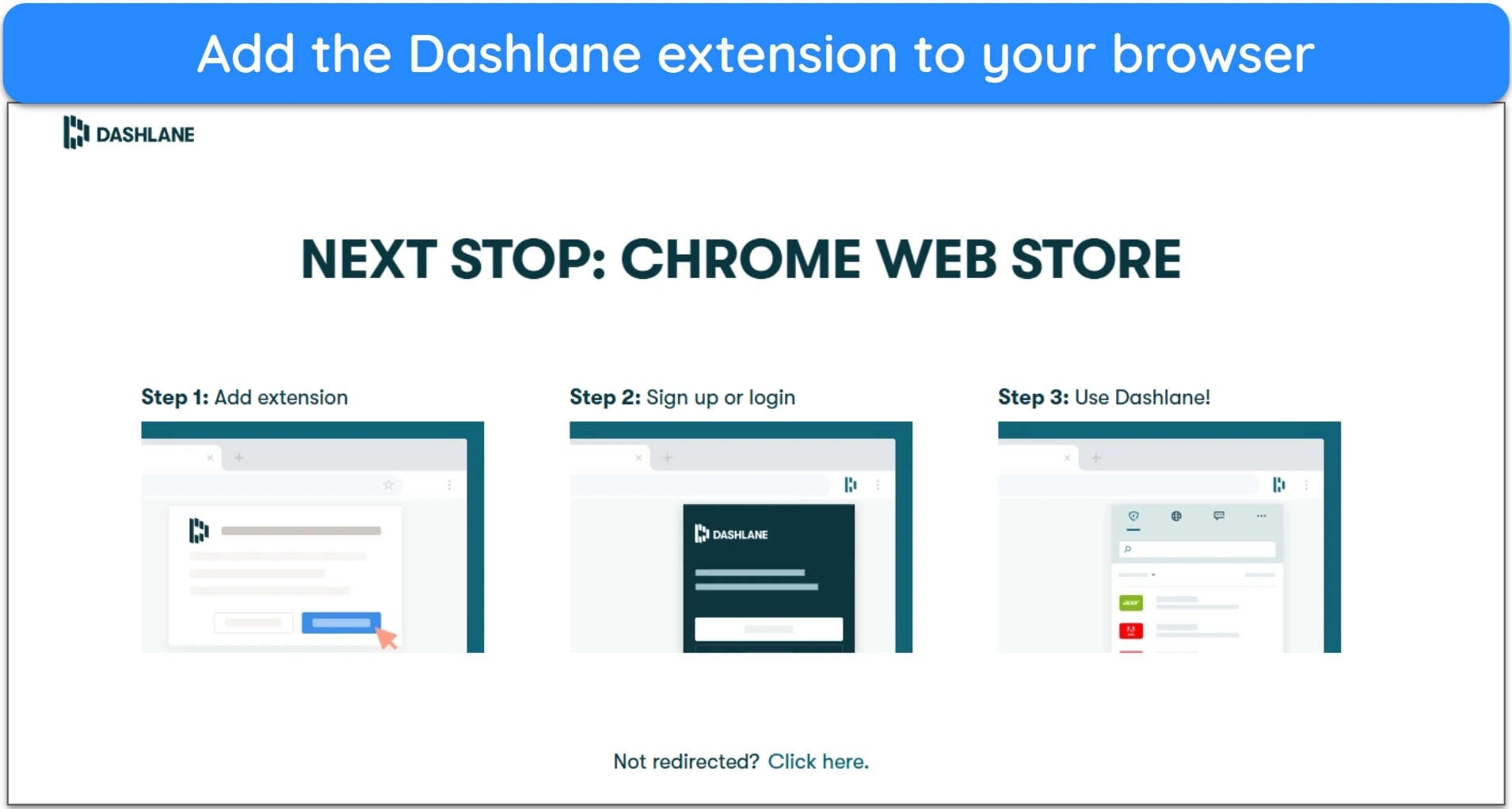
- Install Dashlane. You’ll be automatically rerouted to the extension store for the browser you’re using.
![Image of Dashlane's website showing the auto-reroute to a browser extension store]()
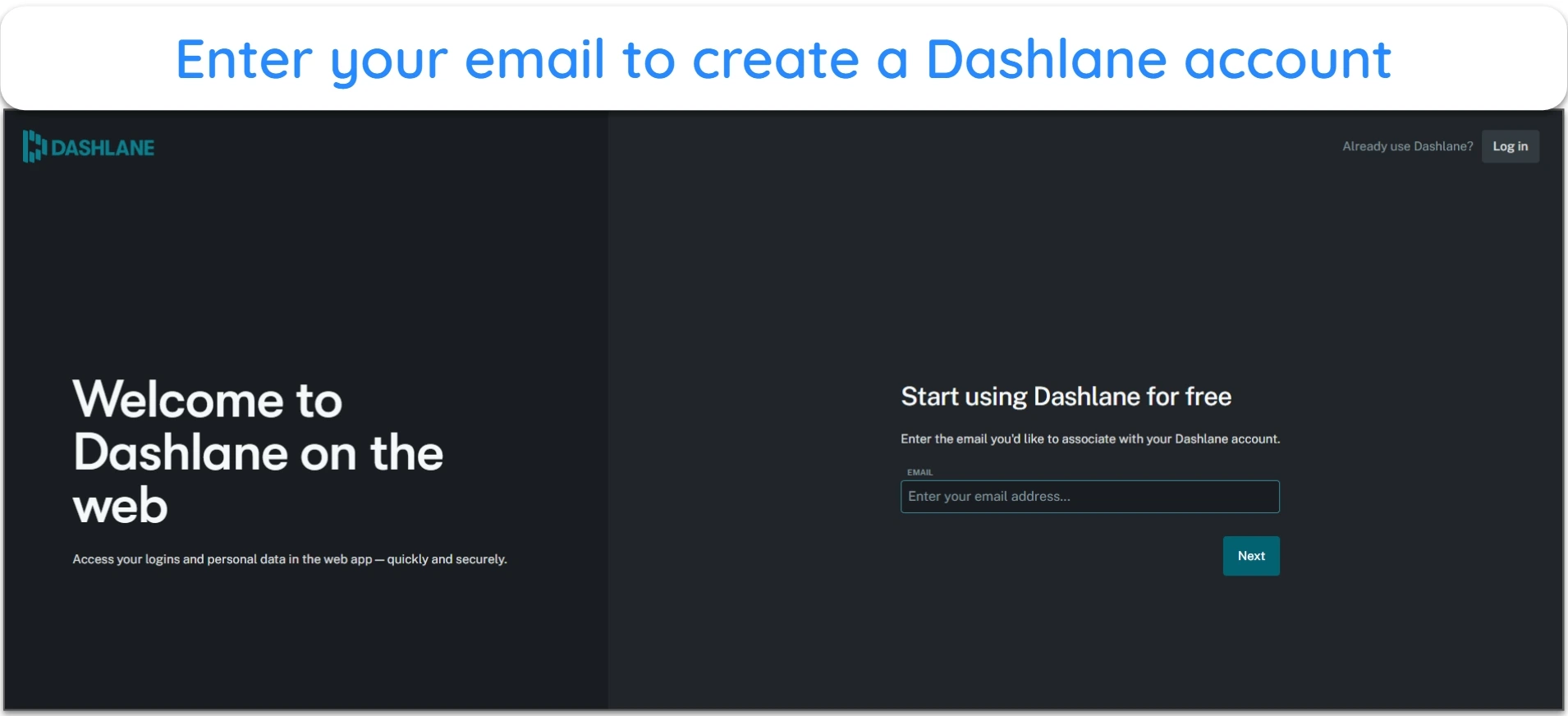
- Create an account. Enter your email address to create a Dashlane account.
![]()
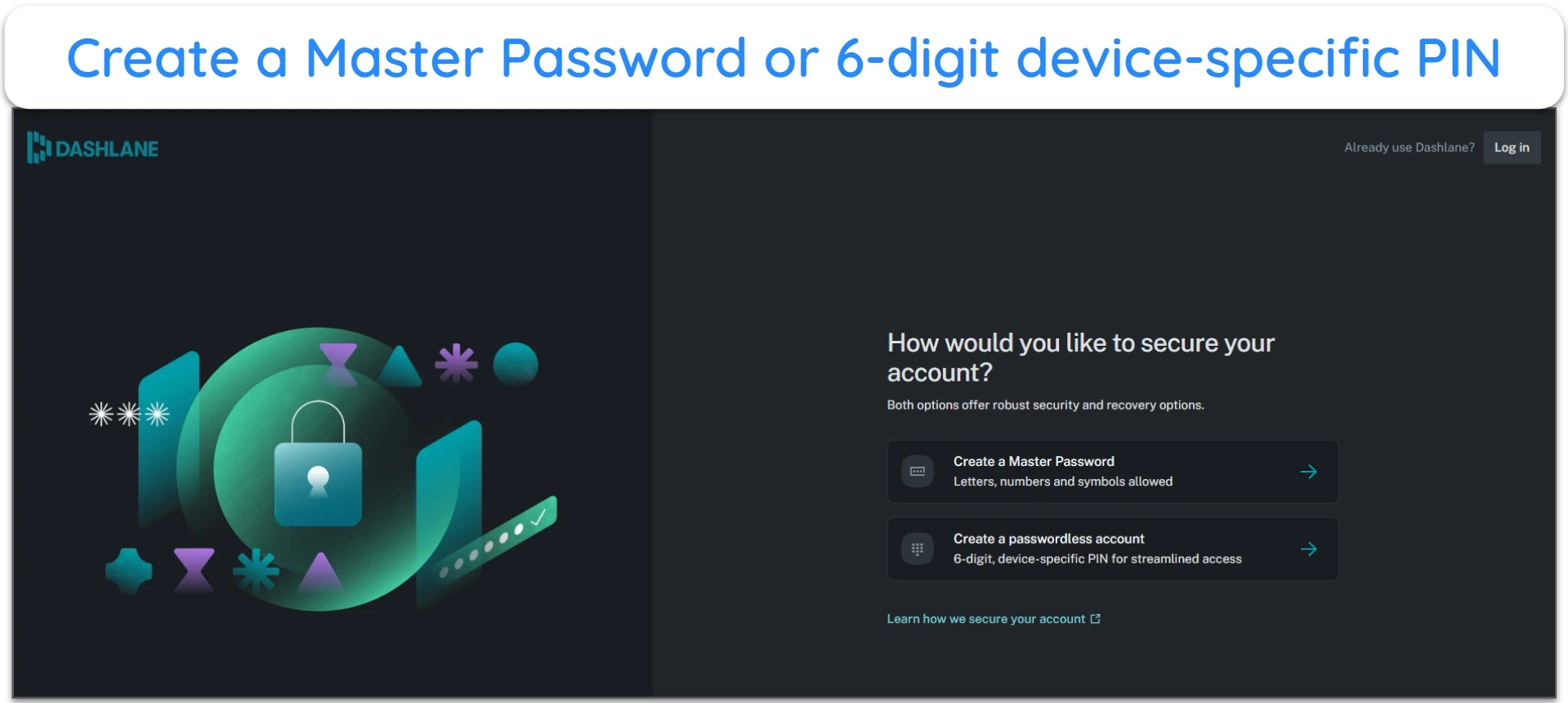
- Secure your account. Create a Master Password or a 6-digit device-specific PIN to secure your Dashlane vault.
![Image of Dashlane's browser extension, prompting the user to secure the account with a master password or PIN]()
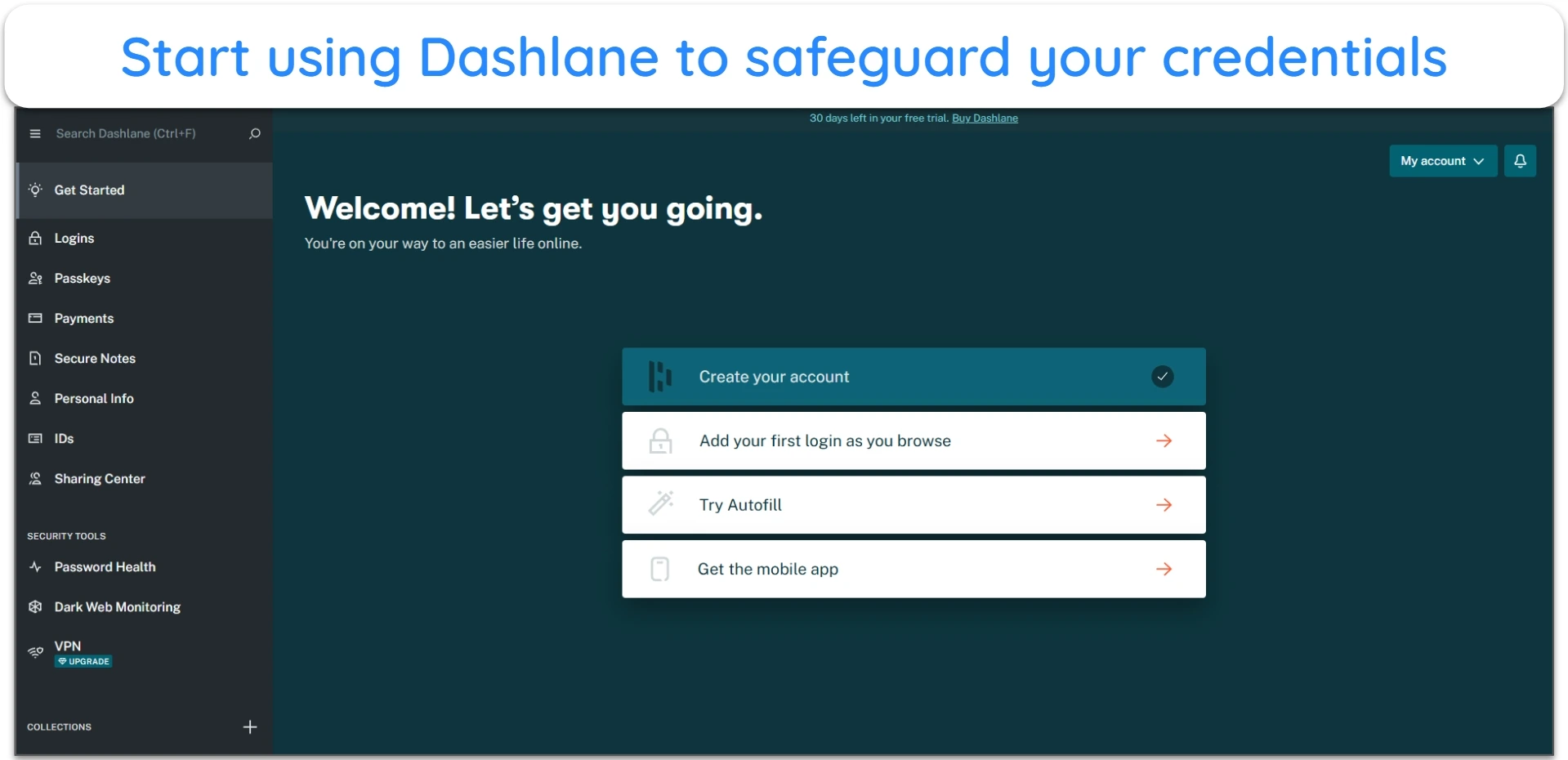
- Use Dashlane. Add account login details, payment information, sensitive files and more with Dashlane.
![Image of Dashlane's password manager browser extension showing the available options]()









Leave a Comment
Cancel